Mobile employee attendance and workplace time tracking
SlidesClock is a freemium productivity app that turns a phone into a workplace time clock for employee attendance. It lets employees clock in and out while giving managers one place to check attendance, schedules, and leave. Suitable for small to medium-sized businesses, it offers a more organized way to track working hours.
For smaller groups, SlidesClock has a free plan for up to five employees, while paid plans increase the team size and add reporting and payroll tools. Like Jibble Tracker, it keeps timekeeping records in one system, giving both employees and managers a central place to handle work hours.
Attendance management at your fingertips
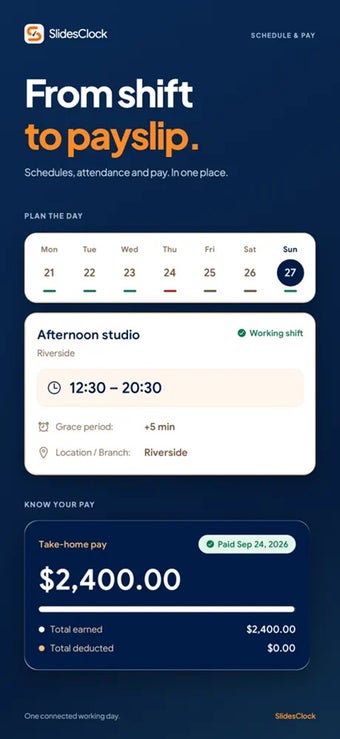
With a simple slide on their phones, employees can clock in and out based on the method set by their organization. They can also check their work schedules, attendance history, and leave balance from the same place. From there, staff can request time off, report attendance or payroll errors, and use shift reminders to avoid missed punches. This keeps their main timekeeping tasks in one place.
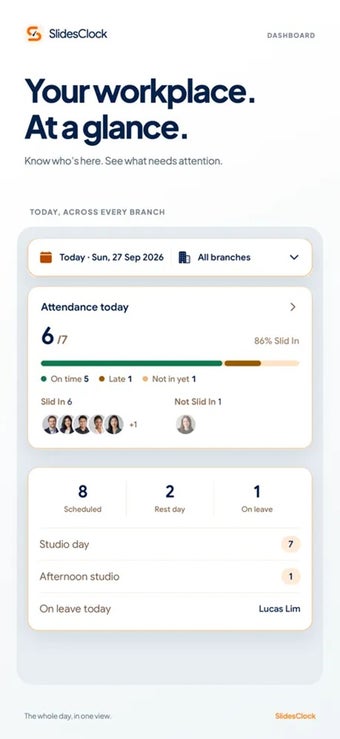
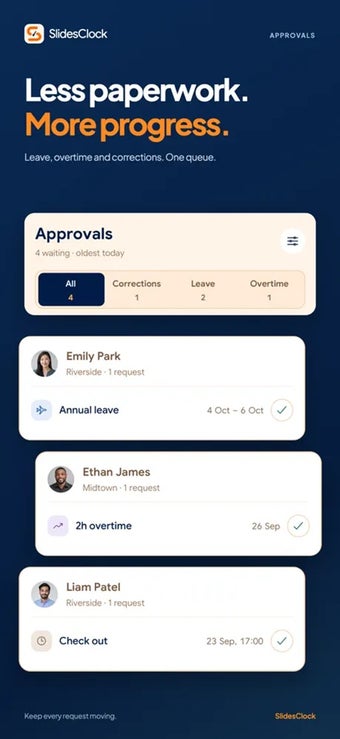
For managers, the focus shifts to keeping attendance records organized. Organizations can choose GPS, workplace Wi-Fi, both, or manual approval to verify each punch. Managers can then oversee schedules, branches, holidays, overtime, and leave policies in one place. They can also approve or reject leave requests and attendance corrections, with supporting evidence attached when needed. This gives managers more control over daily attendance records.
Beyond daily timekeeping, managers can export attendance records as CSV or PDF files for payroll or audits. Paid plans also add payroll processing, payslip publishing, and manager attendance corrections. Meanwhile, employees can access their payslips through the app once these features are available to their organization. However, the free plan covers only five employees, one branch, and one admin, so larger teams need a paid plan.
Accessible and easy-to-use timekeeping tool
Ultimately, SlidesClock works well for small businesses that want attendance, schedules, leave, and payroll records in one system. Its different verification methods also give organizations some flexibility based on how their workplaces operate. The free plan covers basic timekeeping for small teams, while larger businesses will need a paid plan for more employees, branches, reporting, attendance corrections, payroll, and digital payslips.